Getting Started
Mnemo is a local-first desktop study application that combines note-taking, mind mapping, and spaced-repetition flashcards into a single workspace. It is free, private, and runs entirely on your machine without requiring an account.
If you haven't installed the application yet, we recommend starting with the Installation Guide.
Core Features
Your workflow in Mnemo centers around three main tools located under the Library section in the sidebar:
- Notes – A block-based editor featuring nested pages, folders, and rich text formatting.
- Flashcards – Spaced-repetition decks designed for active recall and study sessions.
- Mind Maps – A visual canvas to connect, group, and brainstorm ideas.
Everything runs within a single window. You can easily switch tools using the sidebar, search across your workspace via the top bar, and work directly in the central panel.
🛠️ Active Development: Features like cloud synchronization, mobile app, and AI integrations are planned for the future This documentation covers only the features available in the latest release.
The User Interface
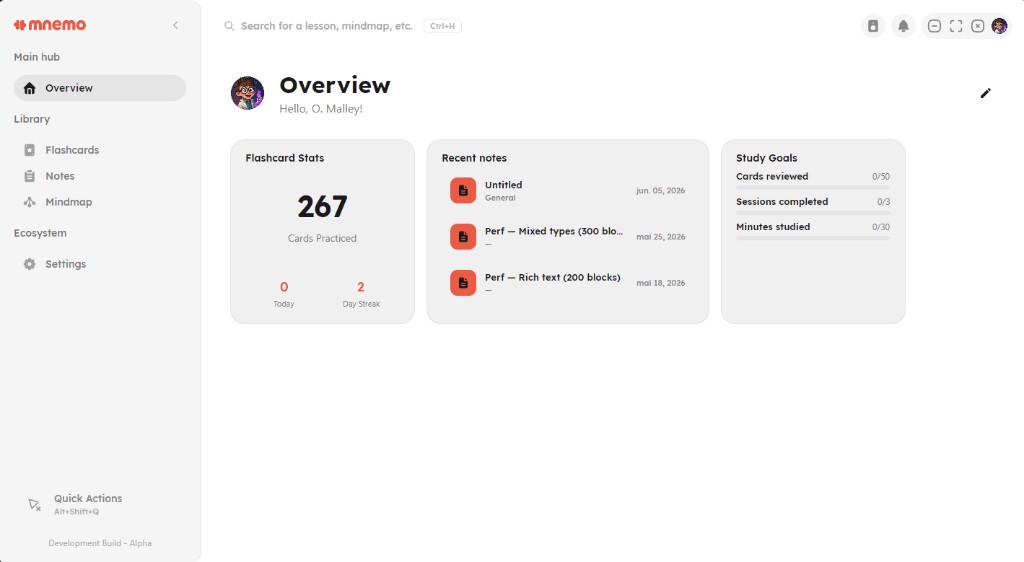
After completing the onboarding wizard, you will land on the Overview page—your central dashboard showing recent notes, flashcard statistics, and daily study goals.
Where to Go Next
Use the table below to find deep-dives on specific workflows:
| If you want to... | Recommended Resource |
|---|---|
| Set up or update the desktop app | Installation Guide |
| Learn how to use the text editor | Introduction to Notes |
| Study using spaced repetition | Flashcard Guide |
| Configure themes, languages, or updates | Settings Guide |
| Resolve an issue or report a bug | Troubleshooting |
Next: Installing · Introduction to Notes